
How to find Zimbra version
Written by Yujin Boby
Edit in WordPressTo find the Zimbra version, log in to the server using SSH, then run the following commands.
Switch to the user “zimbra”
su - zimbraRun the command zmcontrol -v, which will display the version of Zimbra you are using.
zmcontrol -vExample
[zimbra@correo ~]$ zmcontrol -v
Release 8.8.15_GA_3829.RHEL7_64_20190718141144 RHEL7_64 FOSS edition, Patch 8.8.15_P23.
[zimbra@correo ~]$
Using Zimbra Admin
Login to the Zimbra Admin area at
https://your-domain-here:7071/zimbraAdmin/
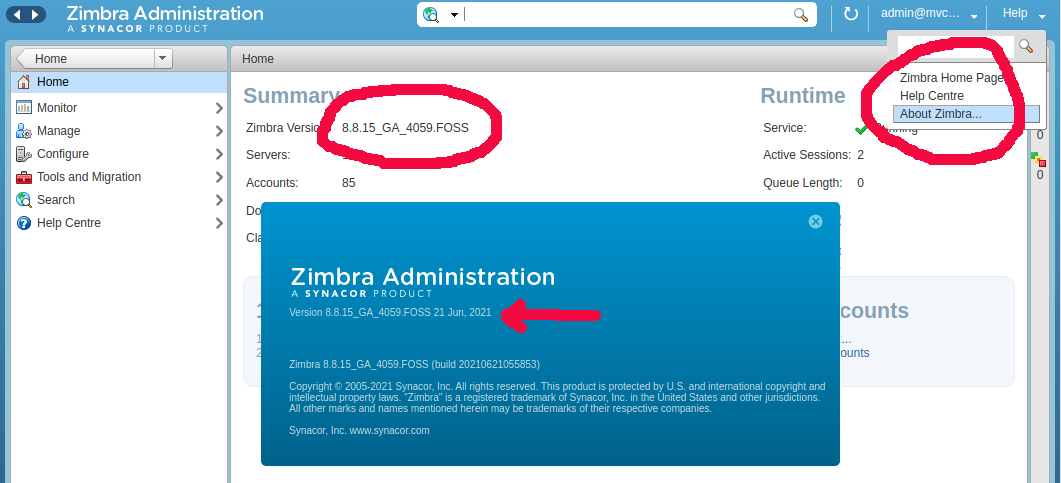
On the Dashboard, you will see the Zimbra version displayed. On the right top side, you will see the “Help” menu. Click on it, then select “About Zimbra”, this will show a popup with the Zimbra version and the build and release date.
See Zimbra